Weight
BMI: what it measures and what it does not
How body mass index is calculated, the WHO ranges and the disease risk linked to each one.
· 3 min read
Key points
- BMI is weight divided by height squared.
- The WHO splits adults into six ranges, from underweight to obesity class III.
- It does not tell muscle from fat, so CatLena combines it with body fat.
BMI (body mass index) is weight in kilograms divided by height in meters squared. A person who weighs 70 kg and is 1.75 m tall has a BMI of 70 ÷ (1.75 × 1.75) = 22.9. It is the simplest way to tell whether an adult's weight is within what is expected for their height.
The ranges
The World Health Organization (WHO) classifies adult BMI into six ranges [1]. The CDC, in the United States, uses the same classification [2]. For each range, the WHO gives the risk of weight-related diseases, such as type 2 diabetes, high blood pressure and heart disease [1]:
| Range | BMI | Risk of associated diseases (WHO) |
|---|---|---|
| Underweight | below 18.5 | low, but with higher risk of other clinical problems |
| Normal weight | 18.5 to 24.9 | average (the reference) |
| Overweight | 25 to 29.9 | increased |
| Obesity class I | 30 to 34.9 | moderate |
| Obesity class II | 35 to 39.9 | severe |
| Obesity class III | 40 or more | very severe |
What BMI does not measure
BMI only uses weight and height. It does not know whether the weight comes from muscle or fat. Someone who does strength training and has a lot of lean mass can have an overweight BMI without excess fat, while someone with a normal weight can carry more fat than is healthy. That is why CatLena shows BMI next to body fat and combines the two in body composition.
How CatLena uses it
In the Weight block on the Body screen, you log the day's weight and CatLena works out your BMI right away, with the WHO ranges. In the real example below, 67.4 kg at a height of 1.69 m gives a BMI of 23.6 (67.4 ÷ 1.69²), in the Normal weight range.
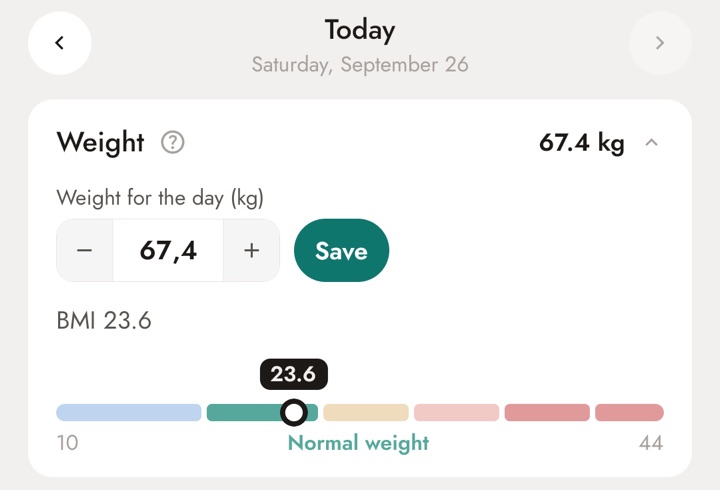
The question mark (?) next to each measure opens the reference ranges in the app, with your range highlighted and an explanation of what it means.
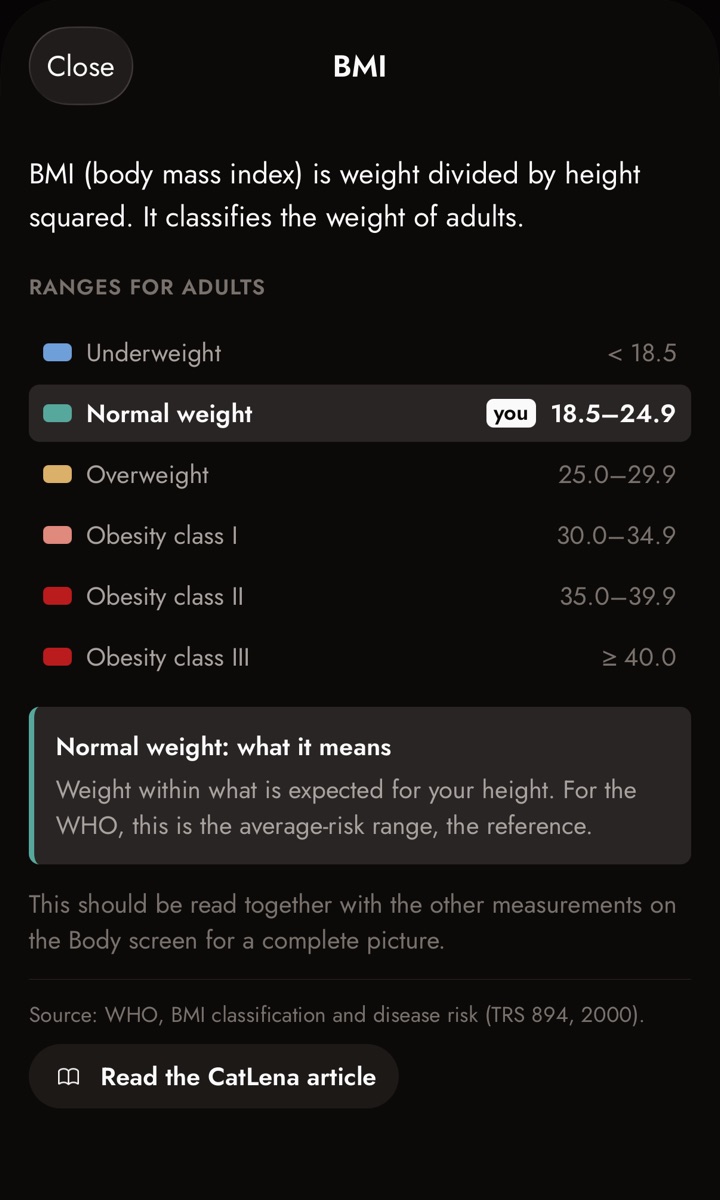
- In the Weight card, the day's BMI appears on a scale with the six WHO ranges and a marker on your value.
- On the screen opened by the question mark (?), your range comes with its meaning, based on the risk the WHO links to it.
- In Body composition, BMI is combined with body fat to show where your weight comes from.
References
- World Health Organization. Obesity: preventing and managing the global epidemic. Report of a WHO consultation. WHO Technical Report Series 894. Geneva: WHO, 2000. See the study
- Centers for Disease Control and Prevention (CDC). Adult BMI Categories. See the study
See this math done for you
In CatLena, you log workouts, meals and measurements (or just chat with CatLena) and the app does this math for you, every day, on your computer and phone.
Get started